Stop paying Vimeo for your LearnDash course videos
Smooth video playback on any connection — no ads, no buffering, no per-view costs.
Install Free Built for real LearnDash workflows · Free tier · No credit cardCourse creators are stuck between three bad options.
Vimeo gets expensive as you grow
More students = higher bandwidth costs. Your bill scales the wrong direction with every signup.
YouTube breaks the learning flow
"Up next" recommendations pull students out of your paid course. One click and they're gone.
Self-hosted MP4 buffers on student wifi
Browsers download the entire file before playback. On a 30-minute lesson, that's where students drop off.
Get started in under 10 minutes
Install both plugins
LearnDash + VideoFlowEngine. Both from WordPress.org. No conflicts — they handle different layers of WordPress.
Upload your videos
Drag and drop in the VideoFlowEngine dashboard. We optimize and encode automatically — adaptive HLS at 360p, 720p, and 1080p.
Paste shortcode into LearnDash
Drop [vfhls_player id="123"] into any lesson or topic. Works in the block editor and the classic editor.
No CDN setup. No streaming config. We handle the infrastructure.
What Vimeo really costs as your course grows
Vimeo's bill climbs with every student who rewatches a lesson. Flat-rate hosting stays predictable.
| Factor | Vimeo | VideoFlowEngine | Winner |
|---|---|---|---|
| Pricing model | Plan fee + metered bandwidth overages | Flat plan — no per-view billing | VideoFlowEngine |
| Bandwidth overages | Extra charges past plan limits | No metered overage billing | VideoFlowEngine |
| Player branding | Vimeo logo unless paid | Your brand, your domain | VideoFlowEngine |
| Student-tracking cookies | Set by vimeo.com | First-party only | VideoFlowEngine |
| Upload flow | Upload to Vimeo, then embed | Upload inside WordPress | VideoFlowEngine |
| Free tier | No real free tier | Yes — free tier, no card | VideoFlowEngine |
Vimeo vs VideoFlowEngine on the things that actually differ for course creators.
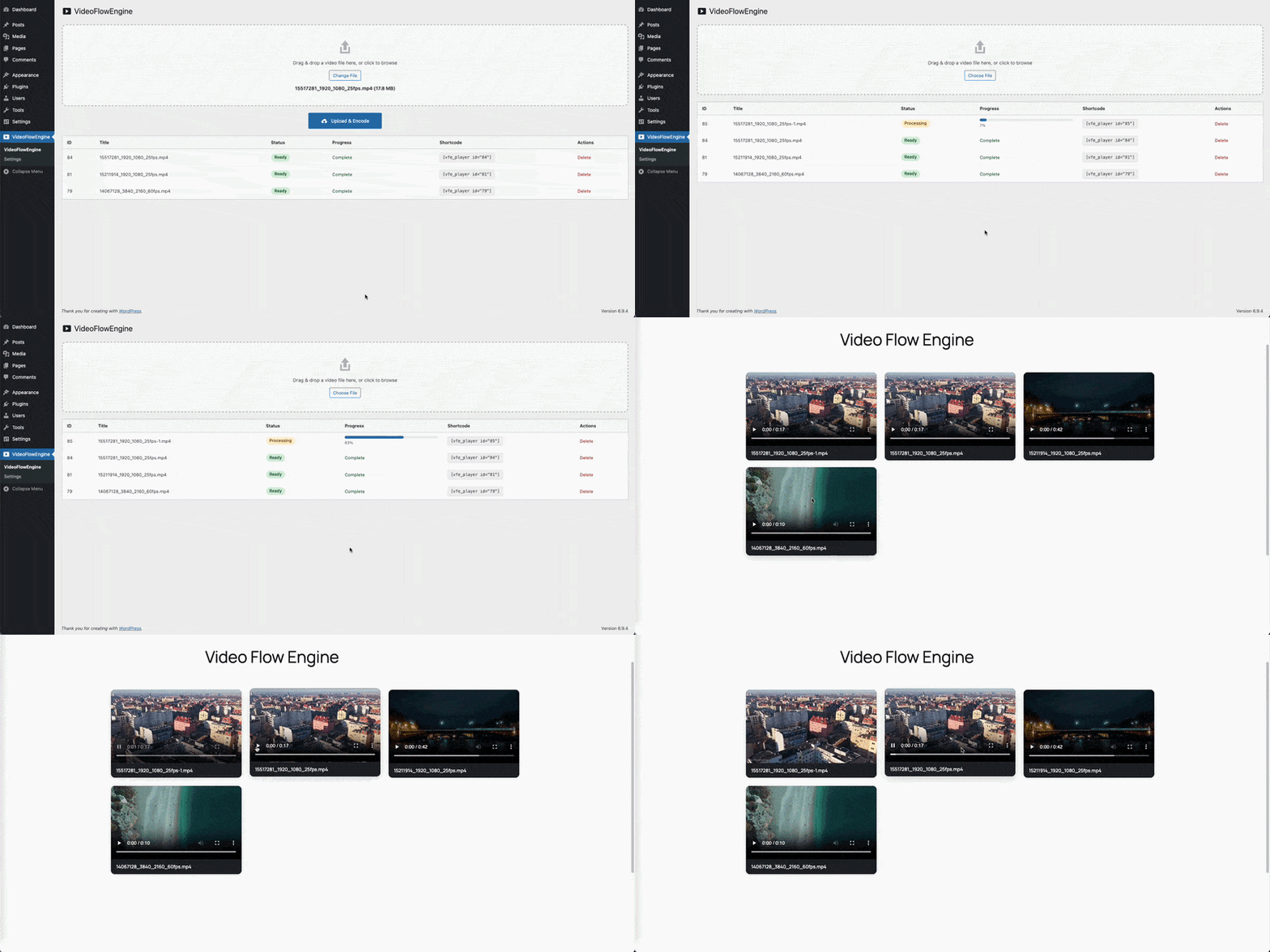
VideoFlowEngine in action — adaptive playback, real HLS stream.
Switch from Vimeo in under an hour
No downtime. No student disruption. Migrate lesson-by-lesson over a week, or all at once.
- Export from Vimeo. Settings → Distribution → Video File Download.
- Upload to VideoFlowEngine. Encoding is automatic — drag, drop, done.
- Replace the embed. Swap the Vimeo embed in your LearnDash lesson with
[vfhls_player id="NEW_ID"]. - Cancel Vimeo when you're done. Or keep the subscription for one billing cycle as backup.
LearnDash + VideoFlowEngine — FAQ
Does VideoFlowEngine work with LearnDash Focus Mode?
Yes — the HLS player renders inside any lesson layout, including LearnDash Focus Mode, because it uses standard WordPress block/shortcode output. Formal LearnDash-version-specific testing is in progress; see the compatibility status below.
Can I use video progression (mark complete when video ends)?
The player emits standard HTML5 video events, so LearnDash's Video Progression setting can hook into the `ended` event. We are validating this end-to-end as part of the compatibility test pass.
Will this break my existing LearnDash quizzes?
No. VideoFlowEngine only handles video embedding inside lesson content. LearnDash quizzes, certificates, drip content, and progress tracking are untouched.
Do students need to sign up for anything extra?
No. Videos play inside your LearnDash lessons the same way as any other embedded video. No separate login, no third-party account.
Can I bulk-migrate my existing Vimeo library?
Currently migration is one video at a time via re-upload. A bulk import helper is on our roadmap for larger course catalogs — get in touch if you have 50+ videos and we will prioritise.
Will videos buffer on slow student connections?
No. VideoFlowEngine uses adaptive HLS (HTTP Live Streaming) — the same protocol Netflix and YouTube use under the hood. The player automatically downgrades to a lower resolution if a student's connection slows, and recovers when bandwidth returns. No buffer wheel, no progressive-download stalling.
Do I need any technical setup or DevOps work?
No. Install the plugin, click Connect, upload videos. We handle encoding, storage, CDN delivery, and adaptive streaming. There's no FFmpeg to install, no R2 bucket to configure, no CDN to set up.
Will it work with my LearnDash theme?
Yes. The video player is a standard WordPress shortcode and Gutenberg block — it renders inside any theme that supports WordPress's standard content output (essentially all of them, including Astra, Kadence, BuddyBoss, GeneratePress, Divi, Elementor).
Stop paying Vimeo. Start owning your course videos.
Install VideoFlowEngine. No credit card. Cancel anytime.
Install Free